

4 Nov 2026 · by Emily Booroff, Social Climbers Founder
11 min read

On 28 October, Meta quietly changed what happens when someone taps your ad.
Until then, a tap on a Facebook or Instagram ad usually took people straight to your website. Now, unless you opted out, that tap may open a shopfront inside Meta's apps first, with your product info and personalised suggestions. Meta calls it product browsing. It switched on by default for ads that were already running, a month before Black Friday.
There's plenty of coverage on what changed. This post is about the question that actually matters: but what does this mean for you? We've answered it three ways, for DTC brands, for TikTok Shop-only brands and for established brands in retail, because the right move depends on where your sales happen today.
Key Takeaways
From 28 October 2026, Meta added product browsing to existing Facebook and Instagram ads unless advertisers opted out. A tap may now open an in-app page with product info and personalised suggestions before anyone reaches your site.
Meta says businesses saw 3% more conversions on average in its own test of around 117,700 advertisers. It hasn't said which conversions, at what cost, or how many advertisers saw a drop.
Your website may see fewer visits while Ads Manager looks steady, so your tracking, landing pages and creative tests can all read differently.
You can still switch it off, or on, for individual ads at any time in Advantage+ Creative and Destination settings.
Every brand type is affected: DTC brands risk losing the landing page that does their selling, TikTok Shop-only brands get a clearer view of where Meta is heading, and retail brands need to check what the in-app page shows.
Don't accept the default or reject it blind. Test it on your own numbers before peak season.
What is Meta product browsing, and what changed on 28 October?
Product browsing is a Meta ad feature that can show shoppers an in-app product experience after they tap your ad, instead of sending them straight to your website. On 28 October 2026, Meta switched it on by default for Facebook and Instagram ads that were already running, unless the advertiser had opted out.
According to Meta's notice to advertisers, as reported by PPC Land, people who tap your ad may see an experience on Facebook or Instagram with product information and personalised suggestions.
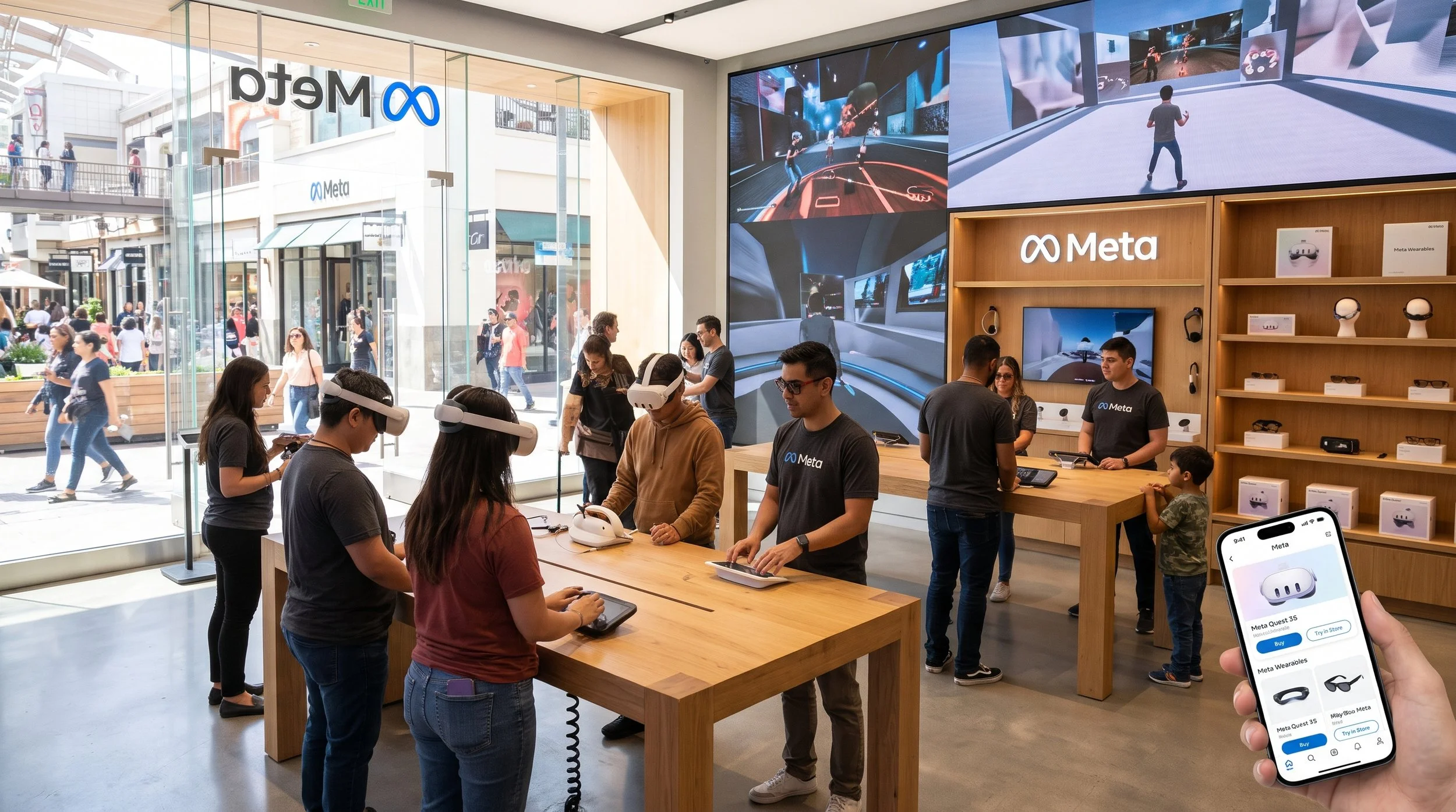
What a shopper sees
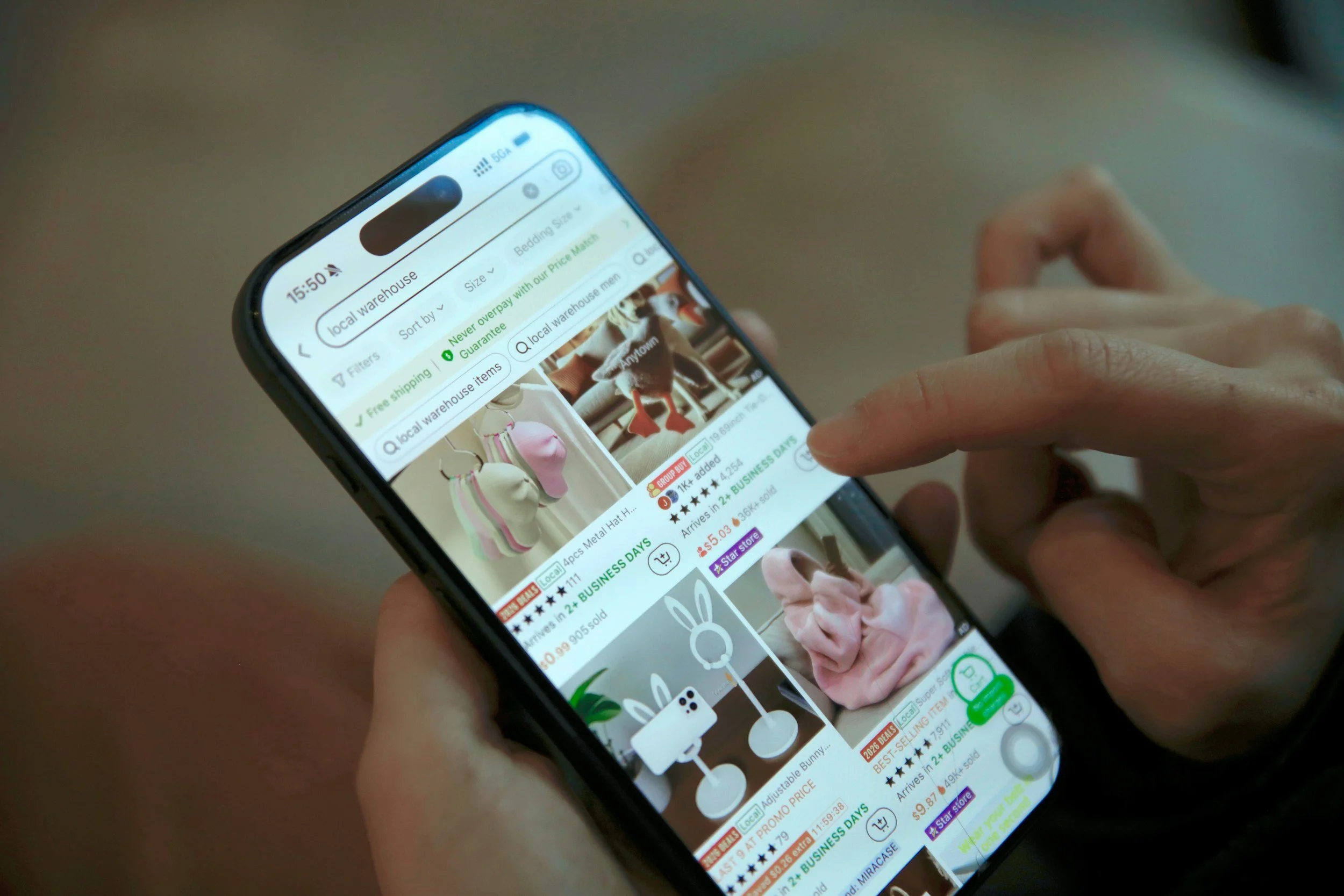
A Meta page before your site. E-commerce agency Common Thread Collective, as cited by BuildMVPFast, describes it as an in-app page built from your product catalogue, using your photos and prices.
Suggestions underneath. Meta adds personalised product suggestions. Common Thread says these may include products that aren't yours, and you don't control them.
An onward route. Shoppers can still continue to your website, but there's now a Meta page in between.
Not every time. Meta's wording is that people may see it. It hasn't said how often, or for which users.
Key dates
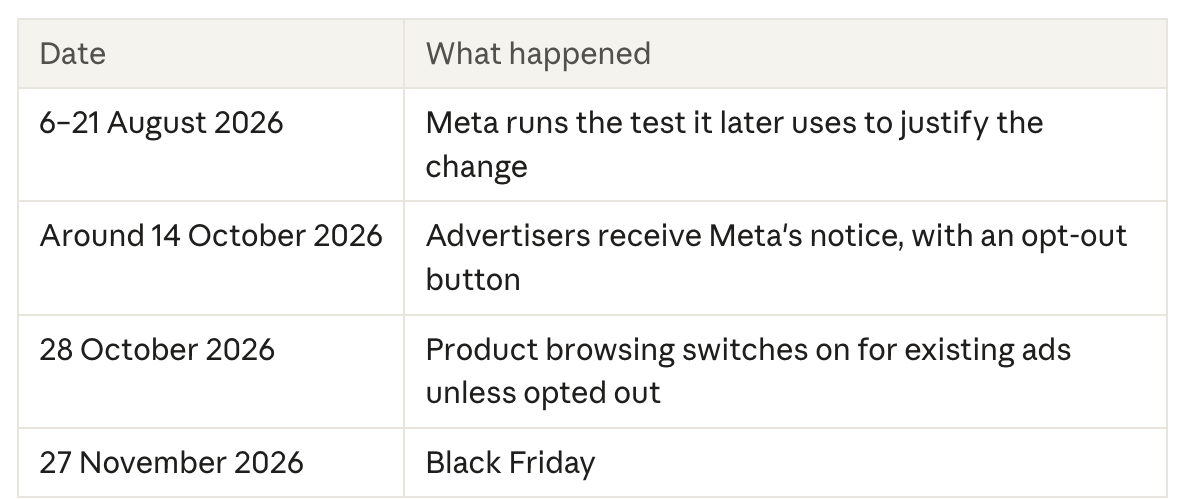
The 14 October date comes from advertisers' LinkedIn posts and third-party change logs, not from Meta. PPC Land says it couldn't find a Meta Help Center page, changelog or newsroom post about the change when it reported on it.
Key Takeaway: Product browsing isn't brand new. It already existed as an optional Advantage+ creative enhancement. What changed is the default: for ads already running, it went from off to on.
Watch Out: The notice talks about "existing" ads. It doesn't say whether ads created after 28 October get product browsing switched on by default, or which placements and campaign objectives are included. Check each ad rather than assuming.
Does Meta product browsing actually increase conversions?
Meta says yes: businesses saw 3% more conversions on average with product browsing. But that figure comes from Meta's own test, and it leaves out the details you'd need to know whether it will work for your brand.
Here's what Meta's footnote, as reported by PPC Land, does tell us:
The test ran from 6 to 21 August 2026.
It covered around 117,700 advertisers globally.
It spanned e-commerce, consumer goods and retail, among other verticals.
Meta says product browsing outperformed with more than 99% confidence.
And here's what it doesn't:
Which conversions. On your website, or inside Meta's apps? Under which attribution window?
At what cost. There's nothing on cost per conversion, revenue, order value or return on ad spend. More conversions at a higher cost would still fit a 3% claim.
Who lost out. An average across 117,700 advertisers says nothing about how many saw a drop.
Whether August predicts November. A two-week summer test may not reflect peak-season shopping.
Key Takeaway: 3% across 117,700 accounts tells you very little about yours. As a conditional example, a store with a clean catalogue and impulse-buy products may gain, while a brand whose sales rely on a carefully built landing page or quiz may lose. Your own test is the only number that counts.
What does product browsing do to your tracking and reporting?
It can make your numbers harder to read. Every shopper who browses inside Meta and never taps through is a visit your website never sees. So your landing page sessions can fall while Ads Manager reports steady or better results.
That matters because your landing page is where your own measurement lives. It's where your analytics, consent banner, promotions and page tests run. Put a Meta page in front of it, and those tools see less of the journey.
There's a creative-testing problem too. Media buyers have said publicly that Ads Manager doesn't separate results driven by your creative from results driven by the experience Meta builds around it. If that's right, you could think an ad is working when the in-app page is doing the work. Treat this as a reported risk rather than a proven fact, and check it in your own account.
Watch Out: Before you change anything, write down your current ratio of Meta link clicks to landing page sessions in your analytics. If that ratio shifts, you'll know why, rather than blaming your creative or your site.
Key Takeaway: Judge any test on your own store's order data, not on Ads Manager alone.
Is Meta's in-app shopfront the same as TikTok Shop?
No, but they're moving in the same direction. Both now keep shoppers inside the app for longer. The difference is where the sale happens: TikTok Shop closes the sale in-app, while Meta's product browsing page still sends shoppers to your website to buy.
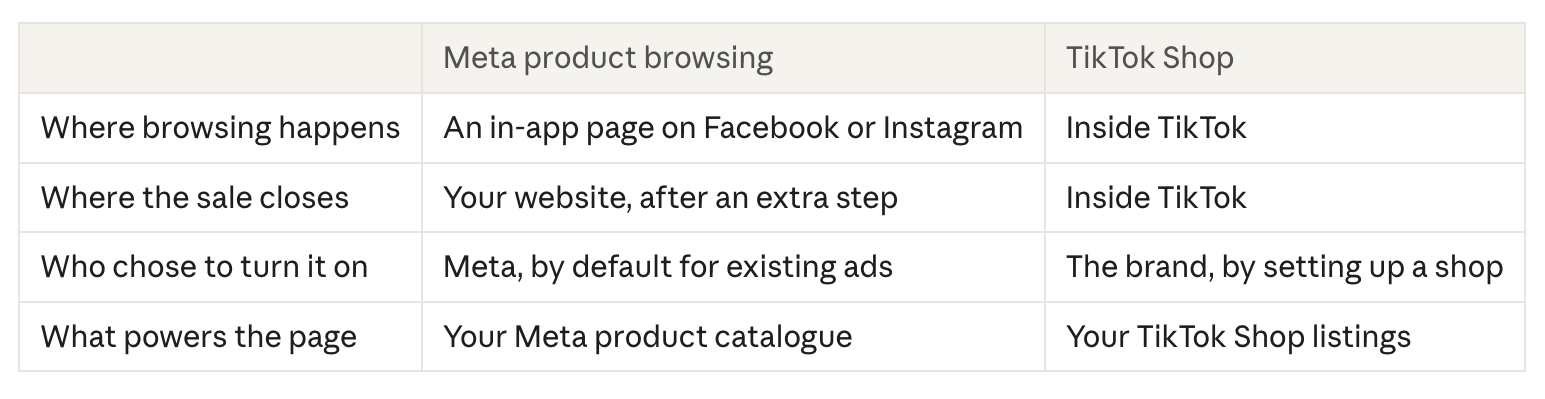
The "who chose" row is the one to sit with. With TikTok Shop, you opt in, build your shop and manage it. With product browsing, Meta builds the shopping experience for you out of whatever is in your catalogue.
Key Takeaway: The direction of travel is clear. Platforms want shoppers to browse, compare and decide without leaving the app. Brands that treat their product data as a shopfront, not an admin task, will be ready wherever that lands.
What does product browsing mean for DTC brands?
For DTC brands, product browsing puts a Meta page between your ad and the website you've spent years perfecting. If your site does the selling, through bundles, a quiz, long-form copy or a carefully tested page, some shoppers may never reach it.
That's the trade-off. Meta's page might help a quick, simple purchase. But if your brand wins on the experience after the tap: the story, the reviews, the upsell, the email sign-up, then every visit that stays inside Meta is a visit you don't own.
Where to focus
Know whether it's on. Check your live ads in Advantage+ Creative and Destination settings. Don't assume.
Protect your best landing pages. Where a page does the heavy lifting, consider switching product browsing off for those ads.
Fix your catalogue. If product browsing stays on anywhere, Meta builds the page from your catalogue. Titles, images, prices and stock all need to be right.
Test before peak. Run matching ad sets with it on and off, and compare on your own sales data.
Watch your email capture. If fewer people land on your site, fewer join your list. That's a long-term cost a 3% average won't show.
Watch Out: Your website traffic may drop while your Ads Manager numbers look fine. Don't cut your website budget on that basis alone. Check the link-click-to-session ratio first.

What does product browsing mean for TikTok Shop-only brands?
For TikTok Shop-only brands, product browsing is a sign that Meta is moving onto your home turf: in-app shopping powered by product data. The skills you've built on TikTok Shop, like sharp listings, strong product imagery and content that sells, are becoming just as important on Meta.
It's also a reason to think about how much of your business depends on one platform. If every customer comes through TikTok Shop, every change TikTok makes lands on you in full. Meta just showed how fast a platform can change the rules on running ads, with around two weeks' notice before peak season.
Where to focus
Treat your product data as a shopfront. On TikTok Shop it already is. If you expand to Meta, your catalogue becomes the shopfront there too, so build it with the same care.
Remember the sale still closes off-platform on Meta. As it's been described so far, the product browsing page sends shoppers on to your website to buy, so you'd still need somewhere for them to land.
Reuse what you know works. Your TikTok content has already shown you which hooks, demos and creators sell. That's a head start for Meta creative, adapted rather than copied.
Build a habit of checking defaults. Whichever platforms you use, make a monthly check of settings part of the routine.
Key Takeaway: Diversifying isn't about leaving TikTok Shop. It's about making sure your brand isn't only findable in one place, and that you're ready as other platforms copy the in-app model.
What does product browsing mean for established brands in retail?
For established retail brands, the biggest question is what Meta's in-app page shows, and where it sends people. If your ads point shoppers to a stockist, a store locator or a brand page, a Meta product page in between may not match that journey.
The page is built from your catalogue, and the suggestions underneath may include other brands' products. For a brand that has spent years building how it looks and sounds, that's a lot of the shopper's first impression handed to an algorithm.
Where to focus
Audit what the page would show. If you run a Meta catalogue, check that it reflects your full, current range, with on-brand images and accurate names.
Check where the onward link goes. Make sure the route from the in-app page to purchase works for your model, whether that's your own site, your stockists or both.
Decide on purpose for brand campaigns. For awareness or storytelling ads, an in-app product page may not be what you want. Switch it off where it doesn't fit.
Watch licensed and partner products closely. Media buyers have reported mismatches between ad copy and the products Meta's systems show when catalogues aren't set up precisely. Treat it as a risk to check, not a certainty.
Talk to your retail partners. If you start sending more shoppers to buy direct, make sure it fits your agreements.
Watch Out: You can't see in advance exactly what the personalised suggestions will include. If brand control matters more to you than a possible small lift in conversions, test carefully before leaving it on.
What should brands do about product browsing right now?
Check it, measure it, then decide ad by ad. The opt-out deadline in Meta's notice has passed, but Meta says you can turn product browsing on or off at any time in each ad's settings. This is the approach we'd propose:
Find out where it's on. Open each active ad and check product browsing in the Advantage+ Creative and Destination settings.
Record your baseline. Note your ratio of Meta link clicks to landing page sessions, plus conversion rate and order value from your own store data.
Sort your ads by job. Ads that rely on a landing page to sell, brand ads and lead-gen ads are the strongest candidates to switch off. Simple catalogue ads for easy-to-buy products are the strongest candidates to test.
Run a fair test. Two matching ad sets, one with product browsing on and one off, for long enough to read before Black Friday on 27 November.
Clean your catalogue. Wherever it stays on, Meta builds the page from your catalogue. Make it accurate and on-brand.
Check duplicates. Some advertisers have reported the setting coming back on when they copied an ad that had it switched off. Check copies before they go live.
Make settings checks routine. Review platform defaults monthly across Meta and TikTok.
Key Takeaway: The brands that do well here won't be the ones that accept every default or reject every change. They'll be the ones that test, and decide on their own numbers.
Conclusion
Since 28 October, a tap on your Meta ad may open an in-app shopfront before it reaches your website. Meta switched product browsing on by default for existing ads, backed by a 3% average conversion lift from its own test, with plenty left unexplained. It can change what your website sees, how your reporting reads and what shoppers see of your brand.
What that means for you depends on where you sell:
DTC brands: protect the landing pages that do your selling, and test before you trust the default.
TikTok Shop-only brands: Meta is moving towards the in-app model you already know. Treat product data as a shopfront, and don't depend on one platform.
Established retail brands: check what the in-app page shows and where it sends people, because your brand is now partly presented by Meta's algorithm.
Whichever group you're in, this change may already be live in your account. The brands that check, test and decide now will go into peak season knowing what their numbers actually mean.
At Social Climbers, we're a TikTok-first social commerce agency, and reading platform shifts like this is what we do. If you'd like help auditing your Meta ads, setting up a fair test or working out how Meta and TikTok Shop fit together for your brand, drop us a line at hello@social-climbers.com.
FAQ
What is Meta product browsing?
It's a Meta ad feature that may show shoppers an in-app page with your product info and personalised suggestions after they tap your Facebook or Instagram ad, before they reach your website.
When did product browsing switch on?
Meta switched it on for existing ads on 28 October 2026, unless advertisers had opted out. Advertisers received the notice around 14 October.
Can I still turn product browsing off?
Yes. Meta says you can turn it on or off at any time in each ad's Advantage+ Creative and Destination settings.
Does product browsing increase sales?
Meta says businesses saw 3% more conversions on average in its own test of around 117,700 advertisers. It hasn't said which conversions were counted, at what cost, or how results varied. Test it on your own data.
Will product browsing affect my website analytics?
It can. Shoppers who browse inside Meta and don't tap through never reach your site, so landing page sessions may fall while Ads Manager looks steady.
Is Meta product browsing the same as TikTok Shop?
No. TikTok Shop closes the sale inside TikTok. Meta's product browsing page sends shoppers on to your website to buy. TikTok Shop is a separate platform with no connection to Meta.
Can Social Climbers help?
Yes. Email hello@social-climbers.com and we'll help you audit your settings, set up a fair test and plan how Meta and TikTok Shop work together.
Sources
PPC Land: Meta will turn on product browsing in existing ads on October 28 (15 October 2026)
BuildMVPFast: Meta product browsing ads turn on for your live ads October 28 (23 October 2026), citing Common Thread Collective